Samsung Mobile Print Control is a free app that is authenticated by BLE in the secured print environment.
Software details
Product description
Samsung Mobile Print Control App
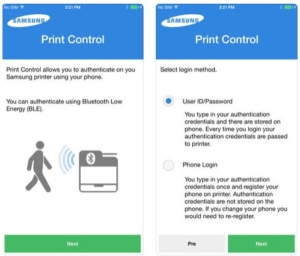
Samsung Mobile Print Control is a free app that is authenticated by BLE in the secured print environment.
Now there is no need to carry a separate card for authentication or install card reader on the printer.
This app will help you use the printer safely just by approaching a printer
Using the Samsung Mobile Print Control App
You can use it to get an authentication/registration from the Samsung Mobile Print Control app.
Authentication from the mobile device
- Check that NFC and Wi-Fi Direct feature is enabled on your printer.
- Open Samsung Mobile Print Control app.
- Type in the ID and Password.
If necessary, type in the ID and Password to log in. If it’s your first time logging into the printer, type in the below default ID and password. We recommend you to change the default password for security reasons.
– ID: admin
– Password: sec00000 - Tag your mobile device (usually located on the back of the mobile device) over the NFC tag () on your printer.
Wait a few seconds for the mobile device to connect to the printer.
You may also like these softwares
Samsung Cloud Print is a free cloud service that allows you to print from your smartphone or tablet to your Samsung printer or MFP.
Update : 09-20-2020 |
Category : Samsung App
System : iOS |
Language : Multilanguage |
Downloads : 1268

Samsung Mobile Print Manager is a free application that makes configuration and printer management easy using NFC.
Update : 09-10-2019 |
Category : Samsung App
System : Android |
Language : Multilanguage |
Downloads : 1146
Samsung Print Service is a system tool that enables wireless printing to Samsung printers and many other printer brands by integrating Mopria technology.
Update : 05-25-2018 |
Category : Samsung App
System : Android |
Language : Multilanguage |
Downloads : 1174